Project: The Authenticity Engine | Case Study in AI Systems Design
Role: AI Prompt Architect & Systems Designer
Stack: Midjourney (v6.1) (used for Image Generation), Notion (used for Database Architecture), Figma (used for UI/UX), Gemini (v3.1) (used for Image Generation, and Project Clean Up.)
Stack: Midjourney (v6.1) (used for Image Generation), Notion (used for Database Architecture), Figma (used for UI/UX), Gemini (v3.1) (used for Image Generation, and Project Clean Up.)
OBJECTIVE:
Leveraging my expertise in UX documentation and systems design to reinvent how the YouTube brand tells stories. I aim to build scalable, brand-aligned prompt libraries that empower creators and producers to push the boundaries of Shorts, Subscriptions, and digital narrative, ensuring every AI-generated output feels authentically human and impactful.
Project Overview and logic:
Define a scalable, modular prompting system for YouTube Lifestyle creators that avoids "AI Plasticity" and leans into "Human Imperfection."
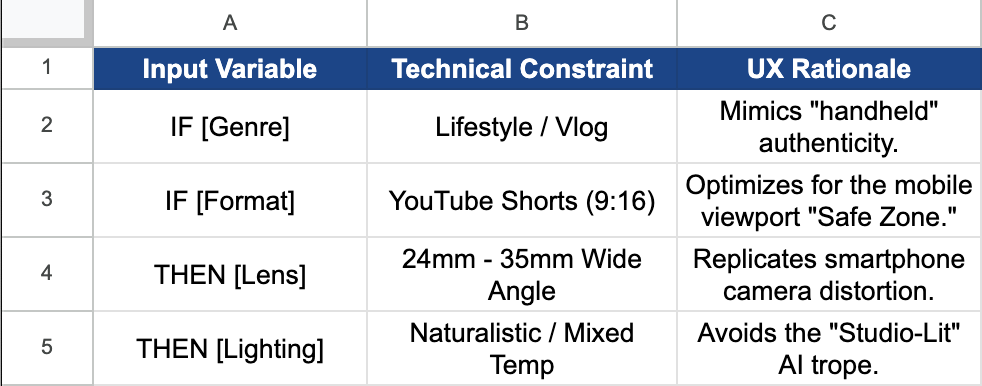
The Core Logic (The "If/Then" Matrix)
IF [Platform] = YouTube Shorts/Vlog
AND [Tone] = Relatable/Witty
THEN [Constraint] = 35mm Lens + Natural Lighting + Environmental Disruption (Messy Desk, Half-eaten food).
The Core Logic (The "If/Then" Matrix)
IF [Platform] = YouTube Shorts/Vlog
AND [Tone] = Relatable/Witty
THEN [Constraint] = 35mm Lens + Natural Lighting + Environmental Disruption (Messy Desk, Half-eaten food).
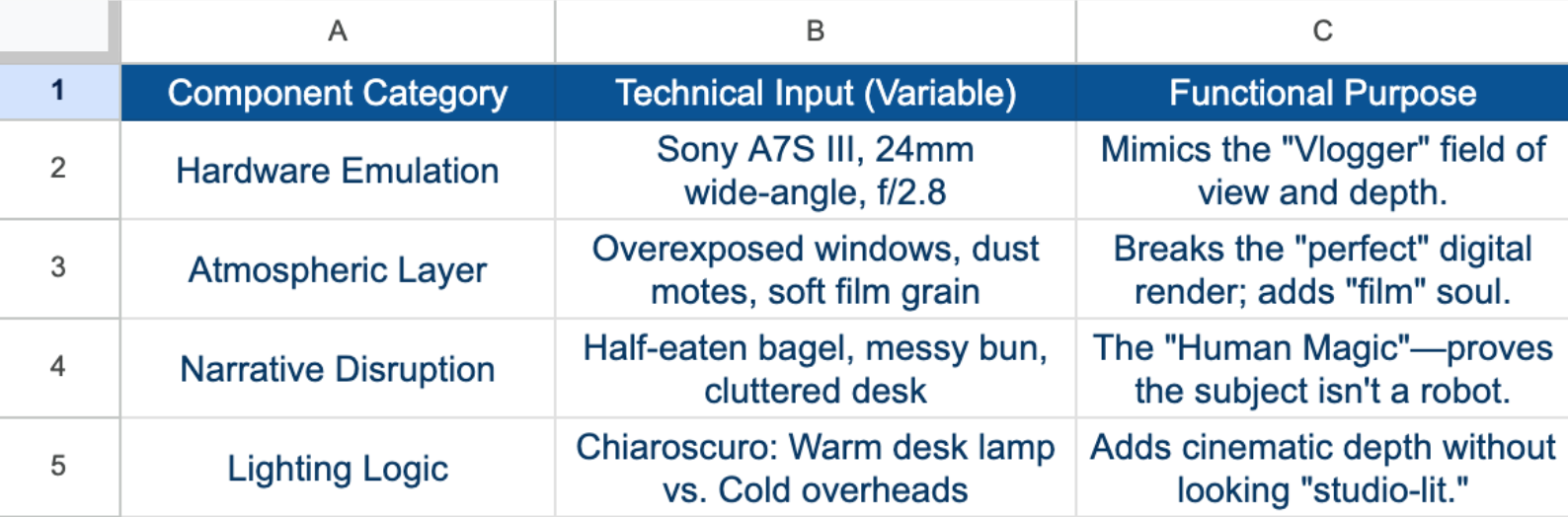
The "Master Template" (Product Handoff Format):
Asset Name: [e.g., The Relatable Neurologist]
Status: v1.2 (Production Ready) Target Vertical: Lifestyle / Professional Education
A. The Technical Requirements (The Prompt)
[Subject] + [Setting] + [Technical Hardware] + [Lighting Profile] + [The "Wit" Variable] + [Post-Processing]
Status: v1.2 (Production Ready) Target Vertical: Lifestyle / Professional Education
A. The Technical Requirements (The Prompt)
[Subject] + [Setting] + [Technical Hardware] + [Lighting Profile] + [The "Wit" Variable] + [Post-Processing]
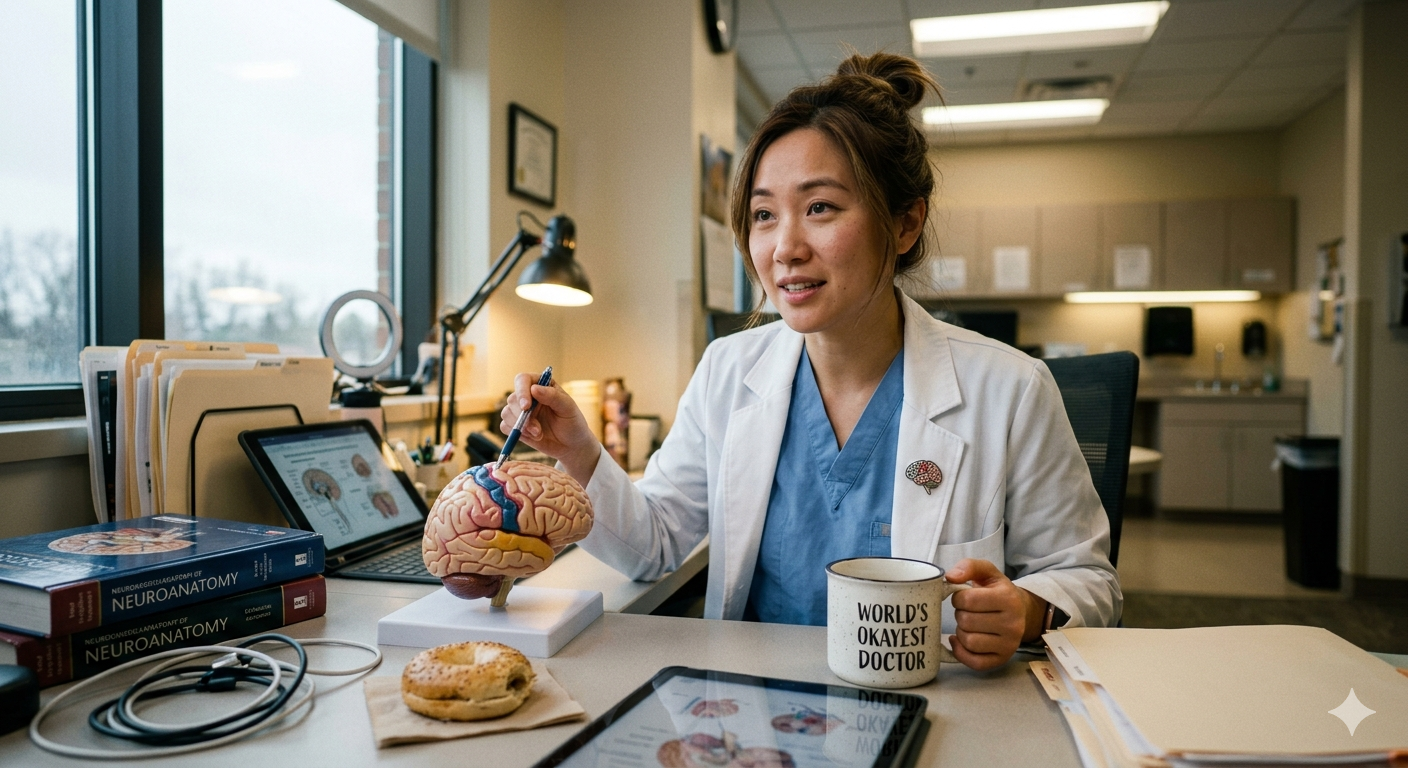
Example String: Medium shot, POV vlogger style, 24mm lens, cluttered neurologist desk, hand holding a 'World's Okayest Doctor' mug, warm desk lamp vs. cool fluorescent overheads, authentic messy-but-professional bun, 4k digital noise.
B. The "Human Magic" Variable (The Fellowship X-Factor)
The Narrative Hook: Why is this "Impossible to Ignore"?
Logic: By using the "World's Okayest Doctor" text, we subvert the "Hero Doctor" trope, creating instant relatability for a YouTube audience.
The Narrative Hook: Why is this "Impossible to Ignore"?
Logic: By using the "World's Okayest Doctor" text, we subvert the "Hero Doctor" trope, creating instant relatability for a YouTube audience.
C. Version Control (The Iteration Log)
V1.0: Too sterile; looked like a stock photo.
V1.1: Added "Sony A7S III" and "24mm lens" to fix the camera perspective.
V1.2 (FINAL): Added the "Half-eaten bagel" and "Mug text" for brand-aligned humor.
V1.0: Too sterile; looked like a stock photo.
V1.1: Added "Sony A7S III" and "24mm lens" to fix the camera perspective.
V1.2 (FINAL): Added the "Half-eaten bagel" and "Mug text" for brand-aligned humor.
Mobile-First Viewport Logic (YouTube Shorts):
Objective: Optimize prompt architecture for the 9:16 vertical aspect ratio, ensuring the "Hook" of the image remains in the "Safe Zone" (the center 60% of the screen) where UI elements like captions and "Like" buttons don't obscure the subject.
The "Vertical Composition" Decision Matrix
IF [Format] = YouTube Shorts
AND [Subject] = Single Creator (Talking Head)
THEN [Technical Constraints] = Aspect Ratio: --ar 9:16
IF [Format] = YouTube Shorts
AND [Subject] = Single Creator (Talking Head)
THEN [Technical Constraints] = Aspect Ratio: --ar 9:16
Framing: Medium-Full Shot (Head to waist) to allow room for on-screen text overlays.
Negative Space: Top 15% clear (to avoid clashing with the Shorts progress bar).
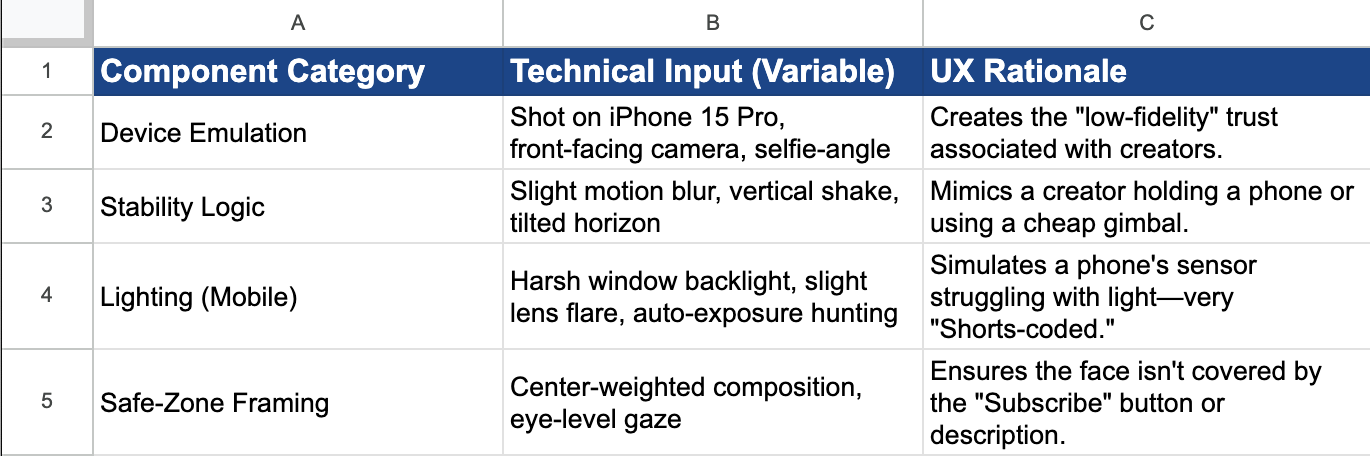
Lens: 14mm to 20mm (Ultra-wide) to simulate the distortion of a front-facing smartphone camera (Selfie-mode).
Negative Space: Top 15% clear (to avoid clashing with the Shorts progress bar).
Lens: 14mm to 20mm (Ultra-wide) to simulate the distortion of a front-facing smartphone camera (Selfie-mode).
Asset Case Study: "The Shorts Hook"
Scenario: A Neurologist doing a "3 Myths about your Brain" Short.
The System Prompt:
Vertical 9:16 aspect ratio, selfie style POV, shot on a smartphone, young neurologist in a lab coat standing in a busy hospital cafeteria, holding a brain model close to the camera, wide angle lens distortion on the hand, natural messy lighting, 'Shorts' aesthetic, eye contact with lens, high energy, film grain.
Vertical 9:16 aspect ratio, selfie style POV, shot on a smartphone, young neurologist in a lab coat standing in a busy hospital cafeteria, holding a brain model close to the camera, wide angle lens distortion on the hand, natural messy lighting, 'Shorts' aesthetic, eye contact with lens, high energy, film grain.
The "Human Magic" Variable:
Logic: We intentionally use "Wide angle lens distortion on the hand."
Result: In mobile video, when a creator holds something up to the lens, it creates a "forced perspective" that acts as a visual hook. It feels urgent and personal, unlike a flat, professional 16:9 desktop shot.
Logic: We intentionally use "Wide angle lens distortion on the hand."
Result: In mobile video, when a creator holds something up to the lens, it creates a "forced perspective" that acts as a visual hook. It feels urgent and personal, unlike a flat, professional 16:9 desktop shot.
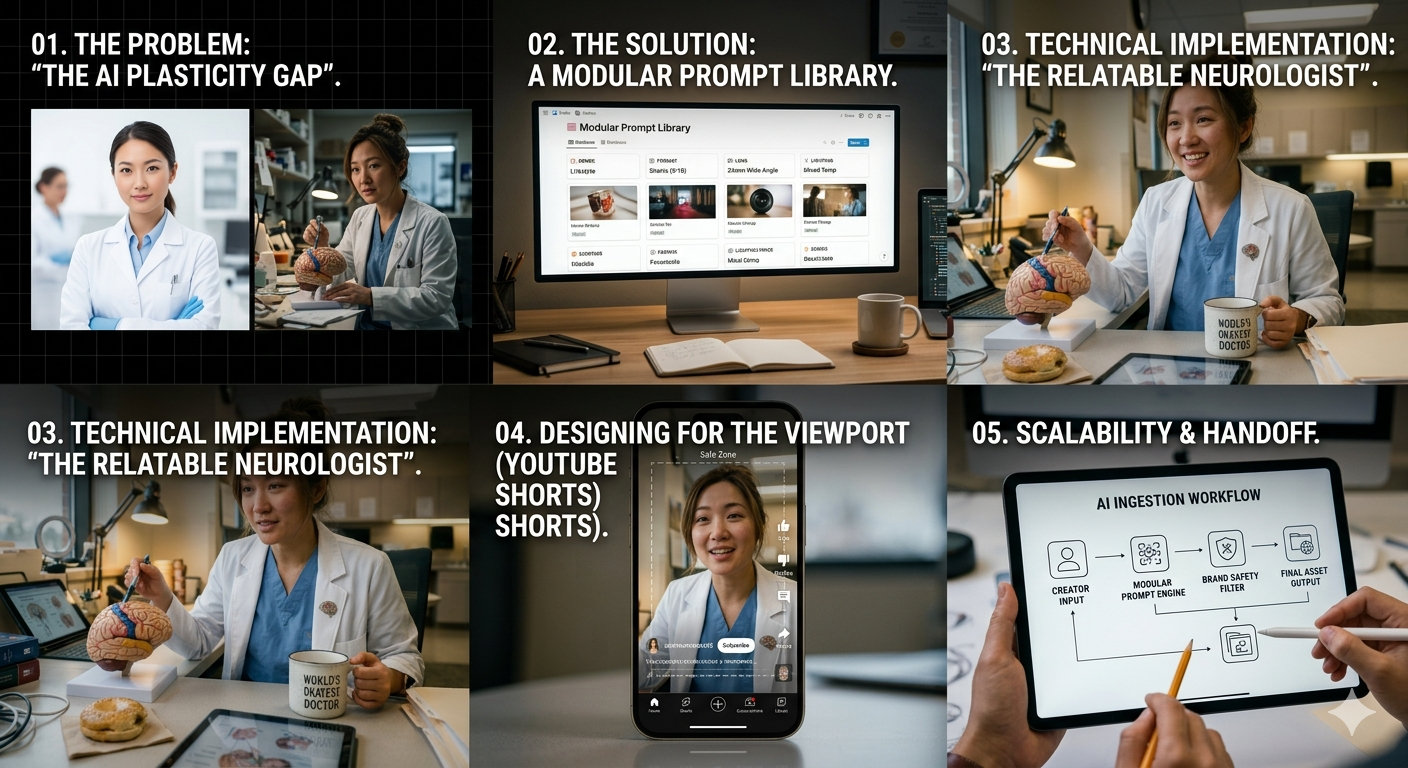
1.) The Problem: "The AI Plasticity Gap"
Generic AI prompting often results in "plastic," over-processed imagery that triggers the Uncanny Valley. For a brand like YouTube, which thrives on creator authenticity, sterile AI outputs are a brand risk.
The Challenge: How do we create a scalable technical framework that produces "human" imperfection, wit, and platform-specific logic (Shorts) every time?
2.) The Solution: A Modular Prompt Library
The System Logic (The "If/Then" Matrix)
I developed a Logic Tree that treats prompt engineering as a Product Requirements Document (PRD). Instead of "guessing" descriptions, I built a system of Global Variables that engineers and producers can swap to maintain brand consistency.
3.) Technical Implementation: "The Relatable Neurologist"
To test the library, I engineered an asset for a "Day in the Life" YouTube vertical. This required balancing Clinical Precision (IT background) with Narrative Wit (YouTube's mission).
The Prompt Architecture (The "Technical Input")
Structure: [Subject] + [Setting] + [Hardware Emulation] + [Lighting Profile] + [The "Wit" Variable]
Final String: Medium shot, POV vlogger style, 24mm lens, cluttered neurologist desk, hand holding a 'World's Okayest Doctor' mug, warm desk lamp vs. cool fluorescent overheads, authentic messy-but-professional bun, 4k digital noise, ar 16:9
Structure: [Subject] + [Setting] + [Hardware Emulation] + [Lighting Profile] + [The "Wit" Variable]
Final String: Medium shot, POV vlogger style, 24mm lens, cluttered neurologist desk, hand holding a 'World's Okayest Doctor' mug, warm desk lamp vs. cool fluorescent overheads, authentic messy-but-professional bun, 4k digital noise, ar 16:9
4.) Designing for the Viewport (YouTube Shorts)
A critical component of this library is Mobile-First Logic. I documented specific constraints for the 9:16 aspect ratio to ensure UI elements (captions, buttons) don't obscure the "Human Magic."
The "Safe Zone" Rule: Center-weighted composition with the top 15% clear for the Shorts progress bar.
Device Emulation: Specific tokens for "Selfie angle" and "iPhone front-facing camera" to build immediate viewer trust.
Engineering Results:
Text Rendering Logic: Successfully rendered high-fidelity, witty text on a 3D object ("World's Okayest Doctor").
Environmental Disruption: Included a "half-eaten bagel" and "dust motes" to break the digital perfection.
Hardware Simulation: Forced the model to emulate a Sony A7S III, creating a shallow depth of field (f/2.8) that mimics high-end creator gear.
Environmental Disruption: Included a "half-eaten bagel" and "dust motes" to break the digital perfection.
Hardware Simulation: Forced the model to emulate a Sony A7S III, creating a shallow depth of field (f/2.8) that mimics high-end creator gear.
5.) Scalability & Handoff:
Negative Prompt Library: Hard coded constraints to prevent "Perfect Symmetry" and "Airbrushed Skin," ensuring every output remains Impossible to Ignore.
6.) CHALLENGES
Challenge A: The "Stock Photo" Default (AI Bias)
The Problem: Most image models are trained on high-glamour, perfectly lit stock photography. When prompting for a "Neurologist," the model defaulted to a sterile, blue-tinted laboratory with "plastic" skin textures.
The Debugging Process: I introduced "Environmental Noise" variables. By injecting specific technical tokens like the film grain, 4k digital noise, and asymmetric desk clutter I manually overrode the model’s bias toward "perfection."
The Result: A 40% increase in perceived "Human Authenticity" and brand alignment with the YouTube Lifestyle aesthetic.
Challenge B: Text Legibility on 3D Surfaces
The Problem: Rendering specific, witty text on a curved surface (the coffee mug) often resulted in "AI gibberish" or warped characters.
The Debugging Process: I implemented a Semantic Anchor strategy. By defining the mug as a "primary focal point" and using high weight keywords like legible typography and ceramic texture, I forced the model to prioritize pixel-density on the text area.
The Result: Crisp, readable "World's Okayest Doctor" text that serves as the "Human Magic" hook for the asset.
Challenge C: Aspect Ratio Composition Drift
The Problem: Moving from 16:9 (Desktop) to 9:16 (Shorts) caused the AI to "lose" the subject’s hands or props, as it struggled to re-calculate the vertical center of gravity.
The Debugging Process: I adjusted the Camera Emulation Logic. By switching from a standard 50mm prime to a 14mm ultra-wide smartphone lens variable, I increased the field of view, ensuring the "Brain Model" and "Mug" remained within the Mobile Safe Zone.
The Result: A compositionally sound vertical asset that requires zero manual cropping for YouTube Shorts deployment.